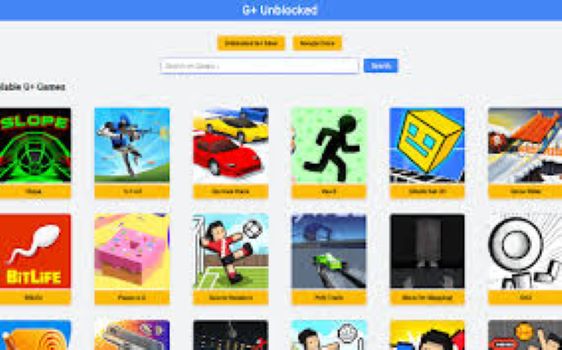
H1: Unblocked Games G+: The Complete 2026 Guide to Free Games at School
If you have ever typed unblocked games G+ into a search bar from a school computer, you already know the frustration that comes before it — a game site that loads at home just fine but hits a brick wall the moment you connect to the school Wi-Fi. G+ unblocked game platforms exist specifically to solve that problem, and in 2026 they have become one of the most widely used ways for students to access free browser games during downtime at school, college, or work. This guide explains exactly what these platforms are, why they work when other sites do not, which games are worth your time, and how to use them responsibly without putting your device or your school account at risk.
What Are Unblocked Games G+ and Why Do They Actually Work?
The “G+” in unblocked games G+ refers to Google-hosted platforms — primarily Google Sites — that serve as the foundation for these game portals. To understand why this matters, you need a basic picture of how school content filtering works.
Most schools and colleges use dedicated network filtering software — tools like GoGuardian, Lightspeed Filter, or Securly — that maintain constantly updated blocklists of websites deemed inappropriate or distracting. These tools are genuinely effective at keeping students away from social media, video streaming, and traditional gaming sites. The problem for filtering software, however, is that Google’s own infrastructure is effectively untouchable. Blocking Google domains wholesale would break Google Classroom, Google Drive, Google Docs, Gmail, and every other tool that modern schools depend on daily. Because of this, domains like sites.google.com are almost universally whitelisted by default.
Game portal creators figured this out years ago. By hosting their collections on Google Sites rather than on independent domains, they sit inside a corner of the internet that school filters are structurally unable to block without collapsing their own digital classroom tools. This is not a hack or a loophole in the traditional sense — it is simply a consequence of how filtering software has to be configured to remain functional.
How School Filters Work — And Where They Fall Short
Content filters broadly work in two ways: blocklist-based filtering, which blocks specific known URLs, and category-based filtering, which blocks entire website categories like “gaming” or “entertainment.” G+ game platforms on Google Sites sidestep both approaches simultaneously. They are not listed on standard gaming blocklists because they do not have the domain patterns those lists look for, and they fall under Google’s infrastructure category rather than any gaming-specific classification.
HTML5 technology has also played a significant role here. Older browser games relied on Adobe Flash, which schools blocked heavily and which Adobe itself discontinued at the end of 2020. The shift to HTML5 means games now run natively in any modern browser without plugins, without downloads, and without triggering the kind of executable file warnings that school IT departments monitor. Everything runs inside the browser tab itself, which is exactly how legitimate educational tools run — making it harder for filtering software to distinguish between a student using a Google Sites learning resource and a student playing Slope for twenty minutes.
The Most Popular Unblocked Games G+ Titles in 2026
Action and Reflex Games Worth Playing
The action game category consistently produces the most-played titles on G+ platforms, and for good reason — they are fast to load, easy to pick up, and work perfectly on Chromebook hardware without demanding processing power.
Slope is arguably the defining game of the entire unblocked games genre. The premise is disarmingly simple: you control a ball rolling down an infinite neon slope, steering around obstacles as the speed increases with every passing second. Its appeal lies in how ruthlessly it punishes small errors and how genuinely difficult it becomes after the first two minutes. Most students who discover it on a G+ platform end up returning to it repeatedly, chasing a personal best score.
Krunker.io has established itself as one of the most technically impressive games available in a browser environment. It is a first-person shooter that manages fluid movement mechanics and fast multiplayer matchmaking entirely within an HTML5 framework. The fact that it plays this smoothly on school Chromebooks without any installation is, genuinely, a minor technological achievement.
Run 3 represents a slightly older entry in the unblocked canon but remains enormously popular. The tunnel-running format, where you navigate a character through increasingly broken pathways in space, adds a rotational dimension that keeps the challenge fresh well beyond what a simple side-scroller offers.
Multiplayer and IO Games
The IO game category — named for the .io domain that many of these titles originally launched on — translates particularly well to the G+ format because the games are browser-native by design and designed for short, competitive sessions.
1v1.LOL is the multiplayer entry that has dominated school gaming conversations for the past two years. Combining shooting mechanics with building elements in a format clearly inspired by the battle royale genre, it offers a competitive experience that fills ten-minute gaps without requiring a full lobby setup or extended time commitment.
Agar.io and Slither.io remain evergreen entries in this category. Both follow a grow-by-consuming format — you start small, consume smaller players or objects, and try to become the largest entity on the server before someone else consumes you. They are the kind of games that explain themselves within thirty seconds of play, which makes them uniquely suited to school environments where you might only have a short window.
Puzzle and Strategy Games
Not every student gravitates toward reaction-based games, and G+ platforms have developed a reasonably strong library of puzzle and thinking games to match. 2048 is the most enduringly popular — a number tile merging game that feels simple until it very suddenly does not. Chess and checkers implementations are also common on these platforms, and their presence gives students who want to argue they are doing something mentally productive a genuinely defensible case.
| Game Title | Genre | Why It’s Popular |
|---|---|---|
| Slope | Action / Reflex | Infinite difficulty curve, competitive |
| 1v1.LOL | Multiplayer Shooter | Fast sessions, competitive depth |
| Krunker.io | FPS | Smooth browser FPS, no download |
| Run 3 | Platformer | Long-form progression, challenging |
| Agar.io | IO / Multiplayer | Simple premise, addictive growth loop |
| 2048 | Puzzle | Brain-engaging, quiet play |
| Happy Wheels | Physics / Action | Unique physics, replayable levels |
| Minecraft Classic | Sandbox | Iconic brand, creative play |
How to Access Unblocked Games G+ on a School Chromebook
This is the section that most game portal pages never actually explain, which is a significant oversight given that many students encounter these platforms without clear guidance on how to use them properly.
The process is straightforward. Because G+ game platforms are hosted on Google Sites, you access them exactly as you would any Google Sites page — by typing the URL directly into your Chrome browser’s address bar. No VPN is required. No extension needs to be installed. No account login is necessary. The page loads like any other Google Sites content would.
If your school uses managed Chromebooks with restricted browsing, you may find that certain games within a G+ platform still fail to load if their assets are hosted on third-party domains that are separately blocked. In these cases, the game tile will appear on the platform but the game itself will not launch. This is a limitation of the specific game’s hosting rather than the G+ platform itself, and it varies by school configuration.
For the smoothest experience, use a Chrome browser that is not in an actively monitored session. Public library computers, home devices, and personal phones all work without any of the Chromebook-specific managed device restrictions that school accounts apply.
It is also worth bookmarking your preferred G+ platform once you find one that works reliably for your specific school environment. Because these pages are periodically updated or moved, having a saved bookmark saves you the time of searching for a working URL each time. Symbaloo-style curated mixes, which organize G+ game links into a visual tile format, are useful precisely for this reason — they aggregate multiple working platforms so that if one goes offline, alternatives are immediately visible.
Best Unblocked Games G+ Platforms Compared
Not all G+ game platforms are equally well-maintained or equally safe. The table below summarizes the key differences between the most commonly cited options in the current landscape.
| Platform Type | Hosting | Game Volume | Ad Load | Update Frequency |
|---|---|---|---|---|
| Google Sites (classroom-branded) | Google Sites | 50–200 games | Low to none | Irregular |
| Google Sites (drive-branded) | Google Sites | 30–150 games | Low | Irregular |
| Symbaloo Mix Collections | Symbaloo | Links to 20–50 platforms | Minimal | Moderate |
| Classroom 6x | Dedicated domain | 200+ games | Moderate | Regular |
| Unblocked Games 66 | Dedicated domain | 300+ games | Higher | Regular |
The Google Sites-hosted options carry the lowest ad burden and the most reliable school network compatibility. Dedicated domain platforms like Classroom 6x and Unblocked Games 66 offer larger game libraries but may be blocked by filters that specifically target known gaming domains. For pure school-network reliability, Google Sites remains the most dependable foundation.
How to Stay Safe While Playing Unblocked Games Online
This is a section that most unblocked game portals deliberately omit because safety guidance is not in their commercial interest. However, it matters — and covering it honestly is part of what separates a trustworthy guide from a raw game-link aggregator.
The primary safety concern with unblocked game platforms is not the games themselves but the advertising infrastructure that surrounds them. Low-quality game portals sometimes serve aggressive ad formats — popups, redirects, and interstitials — that can lead to phishing pages or prompt download requests for software you do not want. Google Sites-hosted platforms are significantly safer in this regard because Google’s own content policies restrict what can be embedded within Sites pages. This is another practical reason to prefer the G+ format over random gaming domains.
A second concern is account security. If a game platform asks you to create an account or log in with your Google credentials, close the tab. Legitimate HTML5 browser games do not require Google account authentication. Any platform requesting this is either poorly designed or actively attempting to harvest credentials.
For students on school-managed devices, it is also worth being aware of your school’s acceptable use policy. Most schools permit recreational browser use during designated free periods and explicitly prohibit it during class time. Using a G+ platform during lunch is a categorically different situation from using one during a teacher-led lesson, and the distinction matters for how seriously any consequences would be taken if a teacher or administrator noticed.
Conclusion
Unblocked games G+ platforms have earned their place as the most reliably accessible free gaming option for students navigating school network restrictions in 2026. They work because of how Google’s infrastructure intersects with school filtering software — not through any sophisticated bypass technique, but through a structural reality that makes blocking Google Sites domains impractical for institutions that depend on Google Classroom. The game libraries available through these platforms are genuinely impressive for browser-based experiences, with titles like Slope, 1v1.LOL, Krunker.io, and Run 3 offering quality that would have seemed impossible in a no-download, no-plugin format a decade ago.
Using them responsibly — choosing well-maintained Google Sites portals over ad-heavy independent domains, understanding your school’s usage policies, and never sharing credentials with any gaming platform — makes the experience both safer and more sustainable. If you are looking for free games that work reliably on a school Chromebook without installations, VPNs, or technical workarounds, unblocked games G+ remains the most straightforward answer available.
Frequently Asked Questions
What does “G+” mean in unblocked games G+?
The G+ designation refers to games hosted on Google-infrastructure platforms, most commonly Google Sites. Because Google’s domains are whitelisted by virtually all school content filtering tools — since blocking them would break Google Classroom and related educational services — game portals hosted on Google Sites bypass school network restrictions more reliably than games hosted on independent domains.
Are unblocked games G+ safe to play on a school Chromebook?
Google Sites-hosted G+ platforms are among the safest options in the unblocked gaming space, primarily because Google’s own content policies govern what can be embedded within Sites pages. The main safety precaution is to avoid platforms that serve aggressive popup advertising or ask for any kind of account login. Legitimate HTML5 browser games require neither an account nor any software download to play.
Will playing unblocked games get me in trouble at school?
This depends entirely on your school’s acceptable use policy and the context in which you play. Most schools permit personal browser use during designated free periods — lunch, study halls, or before and after class. Playing during instructional time is where the risk of consequences begins. Using a G+ platform does not make your activity invisible to school IT staff; network activity is often logged regardless of whether a specific site is filtered, so discretion about timing is more important than the platform choice itself.
Which unblocked games G+ titles work best on low-powered Chromebooks?
Games that perform particularly well on entry-level Chromebook hardware include Slope, 2048, Agar.io, Slither.io, and Run 3. These titles have minimal processing demands and load quickly on modest hardware. Krunker.io and 1v1.LOL are more graphically demanding and may experience frame rate drops on older or budget Chromebook models, though they remain playable in most cases.
Why do some games on G+ platforms not load at school?
Individual games within a G+ portal may fail to load if their game assets — the actual game files — are hosted on a third-party domain that your school’s filter separately blocks. The G+ platform page itself will load because it is on Google Sites, but if the game pulls its content from a blocked domain, it will appear as a blank tile or error. This is common with older game embeds and is resolved simply by trying a different game on the same platform.
For more quality, informative content, visit writewhiz