



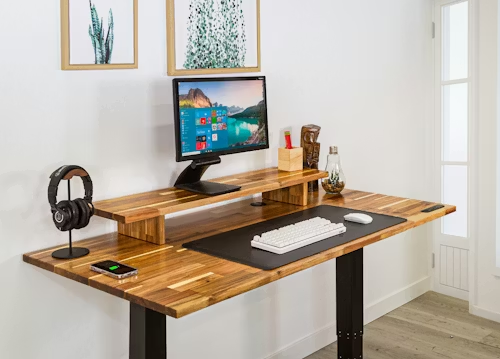
What Is a Riser Desk? The Complete Guide to Desk Risers (Definition, Types, Benefits & Ergonomic Setup)
Title Tag: What Is a Riser Desk? Definition, Types, Benefits & Setup Guide
If you spend most of your workday sitting in front of a screen, you already know the familiar ache — the tightness across your lower back, the stiffness creeping up your neck by early afternoon. Millions of office workers are searching for a smarter way to work, and one of the most practical answers is something you can add to your existing desk today. So, what is a riser desk? Simply put, it is an elevated platform that sits on top of your current desk surface and allows you to switch between sitting and standing positions throughout the day — without replacing your existing furniture, rearranging your office, or spending thousands of dollars. It is a small change with a surprisingly significant impact, and this guide covers everything you need to know before you buy one.
What Exactly Is a Riser Desk, and How Does It Work?
A riser desk — also called a desk riser, standing desk converter, or sit-stand converter — is a height-adjustable platform designed to rest on any standard desk surface. At its core, it raises your monitor, keyboard, and workspace to a standing height on demand, then lowers back down when you want to sit. The mechanism behind this movement is what separates the different categories from one another.
The most common type uses a gas spring or pneumatic lift system. When you press a release lever or paddle, internal gas pressure assists the movement so the platform glides upward or downward smoothly and with minimal effort. You can position it at virtually any height within its range, which typically spans from about five to twenty inches above the desk surface. A second mechanism type uses a hand crank — you rotate it to raise or lower the platform manually, which takes more effort but offers very precise height control. The third and most advanced option is an electric motor, which moves the platform at the touch of a button, often with programmable height memory so you can save your ideal sitting and standing positions.
What makes a riser desk distinct from a full standing desk is that it is additive, not a replacement. Your original desk stays exactly where it is. The riser simply converts it into something smarter.
The Different Types of Riser Desks Explained
Not all riser desks are built the same way, and the right type for you depends on your workspace, your monitor setup, and how you prefer to work. Understanding the distinctions before purchasing will save you a great deal of frustration.
The single-tier riser is the most compact option. Everything — your monitor, keyboard, and accessories — sits on one continuous flat surface that raises and lowers as a single unit. These are typically smaller in footprint and well-suited to minimalist setups with a laptop or a single monitor.
The dual-tier riser is by far the most popular configuration. It separates the monitor platform (the upper tier) from the keyboard and mouse tray (the lower tier). This design allows you to maintain proper ergonomic alignment: your monitor stays at eye level while your keyboard rests at elbow height, regardless of how tall the unit is raised. If you work with a desktop setup and care about posture, the dual-tier is almost always the better choice.
The full-width riser spans the entire length of your desk, providing a generously wide surface that can accommodate dual monitors, a laptop stand, a notebook, and all the peripheral accessories you depend on. These are heavier and less portable, but they create the feeling of a proper standing workstation.
The compact or portable riser is designed for flexibility. It is lightweight, often foldable, and can be repositioned or moved between rooms with ease — ideal for remote workers who alternate between home and office environments.
Finally, electric risers offer push-button convenience and tend to come with smoother, quieter mechanisms. They usually sit at a higher price point but are worth considering if you adjust your height frequently throughout the day.
The table below compares each type at a glance:
| Type | Best For | Typical Price Range | Footprint | Keyboard Tray |
|---|---|---|---|---|
| Single-tier | Laptop users, minimalists | $80–$180 | Small–Medium | No |
| Dual-tier | Desktop users, ergonomic priority | $120–$350 | Medium | Yes |
| Full-width | Multi-monitor, heavy workflows | $200–$500 | Large | Optional |
| Compact / Portable | Remote workers, shared spaces | $60–$150 | Small | No |
| Electric | Frequent adjusters, convenience | $250–$600+ | Medium–Large | Yes |
Why People Are Choosing Riser Desks: The Real Health Case
The appeal of the desk riser is not just about comfort — there is a compelling body of research behind the movement away from all-day sitting. The Mayo Clinic has identified prolonged sitting as an independent risk factor for cardiovascular disease, metabolic syndrome, and premature mortality, even among people who exercise regularly outside of work hours. Research published by the American Journal of Epidemiology found that workers who sit for more than six hours a day have significantly elevated health risks compared to those who sit for fewer than three.
A riser desk does not solve all of those problems on its own — standing all day is not the goal either. What it does is give you the ability to break the cycle of static sitting at regular intervals. A ratio of roughly twenty minutes sitting to eight minutes standing to two minutes of light movement, repeated throughout the day, is commonly cited by occupational health researchers as a meaningful target for reducing sedentary risk. A good desk riser makes that kind of rhythmic variation effortless.
Beyond the longer-term cardiovascular concerns, users consistently report more immediate benefits: reduced lower back pain, less neck and shoulder tension, improved afternoon energy levels, and a noticeable increase in focus during standing periods. For people who experience “tech neck” — the forward-head posture that develops from looking down at a screen — raising the monitor to eye level alone can produce significant relief.
Riser Desk vs. Standing Desk: Which One Makes More Sense for You?
This is the comparison most people land on before making a decision, and it is worth thinking through carefully rather than defaulting to the more expensive option.
A full standing desk is a freestanding unit that replaces your current desk entirely. Electric models typically have two or four motorized legs and can be programmed to switch between heights with a single button press. They offer the most stability, the largest surface area, and the most seamless sitting-to-standing experience. The trade-off is cost — a quality electric standing desk typically runs from $500 to over $1,500 — and commitment. Once you replace your desk, you are committed to that setup.
A riser desk, by contrast, works with what you already have. You are not replacing furniture; you are upgrading it. The cost is substantially lower, the installation requires no tools and takes under ten minutes, and if you move homes or offices, you simply take the riser with you. For renters, students, people in shared offices, or anyone who is simply cautious about committing to an expensive ergonomic overhaul, the riser desk is the smarter first step.
The limitation worth acknowledging honestly is stability. A riser desk sitting on top of another desk introduces a small amount of flex that a fully integrated standing desk does not have. At maximum height, particularly with a heavy dual-monitor setup, some riser models can wobble noticeably during typing. Quality risers with a wide, low-profile base minimize this significantly, but it remains a consideration for users who are particularly sensitive to surface movement.
| Feature | Riser Desk | Full Standing Desk |
|---|---|---|
| Average cost | $80–$500 | $500–$1,500+ |
| Installation | None — sits on existing desk | Replaces current desk entirely |
| Stability | Good (excellent on quality models) | Excellent |
| Portability | High | Low |
| Surface area | Moderate | Full desk width |
| Ideal for | Budget-conscious, renters, first-timers | Long-term, high-use, large setups |
| Setup time | Under 10 minutes | 1–3 hours (assembly required) |
Who Should Buy a Riser Desk — and Who Probably Shouldn’t
A riser desk is an excellent fit for a wide range of people. Remote workers and home office users benefit enormously because the investment is low and the flexibility is high. Students who study for long hours at a desk can reduce fatigue significantly. People experiencing early-stage back or neck discomfort — before the problem becomes chronic — often find that even occasional standing breaks provide measurable relief. Office workers in shared or rented spaces appreciate that a riser desk requires no modifications to the workspace and can be packed up and taken home.
That said, a riser desk is not universally the right answer. If you regularly work with three or more large monitors, a compact or mid-size riser may not provide adequate width or weight capacity. If you work in a creative field that requires precise hand movements — architectural drafting, illustration, fine editing work — the marginal wobble of a riser at full height could be genuinely disruptive. And if you already know that you will adjust your height a dozen times a day over many years, investing directly in a quality electric standing desk from the outset may be more cost-effective in the long run.
How to Set Up a Riser Desk Correctly for Maximum Ergonomic Benefit
Owning a riser desk and using it correctly are two very different things. A surprising number of people purchase a standing desk converter, raise it to a comfortable-seeming height, and then develop new discomfort because the setup is not ergonomically calibrated. Getting the positioning right takes about five minutes and makes an enormous difference.
When you are standing, your elbows should bend at roughly 90 degrees while your hands rest naturally on the keyboard. Your wrists should be flat — not angled upward or downward. This elbow angle determines the correct height for your keyboard tray or lower platform. Once that is set, check your monitor: the top of your screen should sit at approximately eye level, or very slightly below, so that your eyes meet the upper third of the display without tilting your head forward or back. If you use a laptop, a separate external keyboard and the raised riser platform together achieve this naturally.
Your monitor should be at arm’s length — roughly 20 to 30 inches from your face. If you find yourself leaning forward to read text, the screen is too far away or the font is too small, and raising or lowering the monitor will not fix a distance problem. An anti-fatigue mat placed on the floor beneath you is not a luxury; it reduces the pressure on your feet, knees, and lower back during standing periods and meaningfully extends how long you can comfortably stand before needing to sit.
One of the most common and easily corrected mistakes is treating the riser desk as a standing desk rather than a sit-stand desk. The goal is variation, not endurance. Standing for two hours straight without a break is not healthier than sitting for two hours straight — it simply redistributes the strain to different joints. Aim for regular transitions, ideally at least once per hour in each direction.
How to Choose the Right Riser Desk: A Practical Buyer’s Framework
Before purchasing, there are five specific factors that are worth evaluating methodically rather than relying on brand reputation or price alone.
The first is height range. A riser desk that does not reach your ideal standing height — or cannot lower enough to sit comfortably — is the single most common source of buyer disappointment. Most quality risers offer a range from zero to around sixteen to twenty inches of elevation. If you are taller than six feet, look specifically for models that reach the higher end of that range.
The second is weight capacity. Each unit has a maximum load it can safely support. If you are using a large monitor, a second display, a laptop, and accessories, that load adds up quickly. Always check the weight capacity against the actual weight of your setup before buying, with a comfortable margin to spare.
The third is desktop depth. A riser with a deep platform requires that your existing desk is deep enough to accommodate it without pushing your monitors uncomfortably far away. Measure your desk depth first, then check the riser’s base dimensions.
The fourth is keyboard tray design. On dual-tier models, the keyboard tray should have enough depth for both a full-size keyboard and your mouse, and ideally should extend slightly toward you rather than sitting flush with the upper platform — this encourages a more neutral wrist angle.
The fifth is build quality and stability. Price is a reasonable proxy here, but not a perfect one. Read reviews specifically for comments about wobble at full extension, because a riser that shakes during typing will be abandoned within a week regardless of its other merits.
Common Mistakes People Make With Riser Desks
Even with the right equipment, setup errors are common. The most frequent is raising the platform to the wrong height — often too high — which causes people to shrug their shoulders while typing and creates tension across the trapezius muscles faster than sitting ever would.
A second mistake is ignoring the keyboard tray entirely. Many users simply raise the full platform and place both the monitor and keyboard at the same elevated height, which forces them to look down at the keyboard while their monitor is above eye level — or vice versa. The separate keyboard tray exists precisely to solve this problem, and it is worth using it as designed.
Third, many people underestimate how gradually they need to build up their standing time. If you have been sitting for years and suddenly stand for four hours on your first day with a riser desk, you will experience foot and leg fatigue that makes the whole experience feel negative. Building up to longer standing periods over one to two weeks allows your body to adapt progressively.
Conclusion
A riser desk is one of the most practical, accessible, and cost-effective ergonomic upgrades available to anyone who works at a desk. It does not require a new desk, a large budget, or a complicated installation — it simply requires the decision to stop treating sedentary sitting as the default state of knowledge work. Whether you choose a dual-tier gas spring model for your home office or a compact portable riser that travels with you, the principles are the same: vary your position throughout the day, set up the ergonomics correctly, and give your body the variation it was built for. The research is clear, the benefits are real, and the barrier to entry has never been lower.
Frequently Asked Questions
What is the difference between a riser desk and a standing desk?
A standing desk is a freestanding piece of furniture that replaces your existing desk entirely, while a riser desk is an adjustable platform that sits on top of your current desk surface. A standing desk typically offers greater stability and a larger work area, but costs significantly more and requires a full desk replacement. A riser desk is a lower-cost, non-permanent alternative that converts any standard desk into a sit-stand workspace.
Are riser desks actually worth it?
For most desk workers, yes — particularly as a first step into ergonomic working. The health benefits of reducing continuous sitting are well documented, and a quality desk riser provides those benefits at a fraction of the cost of a full electric standing desk. The caveat is that a riser desk is only as effective as the habits built around it. Using it twice a week will produce far less benefit than transitioning between sitting and standing multiple times each workday.
Can a riser desk hold two monitors?
Many riser desks can support dual monitors, but it depends on the specific model’s weight capacity and platform width. A dual-monitor setup using two 24-inch displays and their stands can easily weigh 25–35 lbs combined. Always verify that the riser’s rated weight capacity exceeds the total weight of your setup, and that the platform is wide enough to position both screens at a comfortable viewing angle.
How high should a riser desk be set when standing?
The correct height is determined by your elbow angle, not by the riser’s maximum height setting. When standing with your arms relaxed at your sides and your elbows bent to approximately 90 degrees, your hands should naturally meet the keyboard surface. Adjust the riser until that alignment is achieved, then set your monitor so its top edge is level with — or just slightly below — your eyes. Every person’s correct height will differ based on their individual height and arm proportions.
Does a riser desk damage the surface of your existing desk?
Most riser desks are designed with a flat, padded base that distributes weight evenly across the desk surface and does not cause scratching or permanent indentation under normal use. However, very heavy risers on soft wood or veneer desk surfaces can leave faint marks over time. Placing a thin rubber mat or felt pad between the riser’s base and your desk surface eliminates this concern entirely.
How long should I stand at a riser desk each day?
Occupational health guidelines generally suggest that you should not stand continuously for more than 30 to 45 minutes at a time, and that standing should be balanced with sitting and brief movement breaks. A practical rhythm endorsed by many ergonomics researchers is roughly 20 minutes of sitting, 8 minutes of standing, and 2 minutes of light movement per cycle. Over a full workday, this means you might accumulate two to three hours of standing time — which represents a meaningful reduction in sedentary exposure without placing excessive strain on your joints.
For more quality, informative content, visit writewhiz